
 Google Chrome
 Microsoft Edge
 Brave
Brave Opera
Opera Vivaldi
Install Mindova
Add Mindova to your supported desktop browser or get the Android app from Google Play.
Welcome Back
Sign in to continue
Continue with GoogleLogin with Email
Don't have an account? Sign up
Get Full Experience
WEBSITE BLOCKER + FOCUS APP
Mindova helps you block distracting websites and apps, set daily limits, run Focus Sessions, and understand where your attention goes across desktop and mobile.
7-day free trial • No credit card required to start • Paid plan required to continue
Tested on Chrome, Microsoft Edge, Brave, Opera and Vivaldi.
Mindova — Site Management
Site Management
Manage your productive and distractive websites
Popular Distractive Sites
PRODUCT DEMO
Watch a quick demo of how Mindova helps you block distracting websites, set limits, and protect focused work or study time.
Install Mindova through the Chrome Web Store and use it on supported Chrome, Microsoft Edge, Brave, Opera and Vivaldi desktop browsers.
Mindova helps you create clearer boundaries around distracting websites. Choose the sites that interrupt your attention, create a blocking rule and protect time for studying, working or deep focus.
Add timed sessions and contextual nudges when you want extra support returning to the task you intended to complete.
Mindova is a desktop browser extension and an Android app. The iPhone app is coming soon.
Add Mindova to your supported desktop browser or get the Android app from Google Play.
Welcome Back
Sign in to continue
Don't have an account? Sign up
Get Full Experience
Select distracting websites on desktop or apps on your phone, then set the limits that work for you.
Quick Setup
Configure your productivity settings
Sites to block (1):
Popular choices:
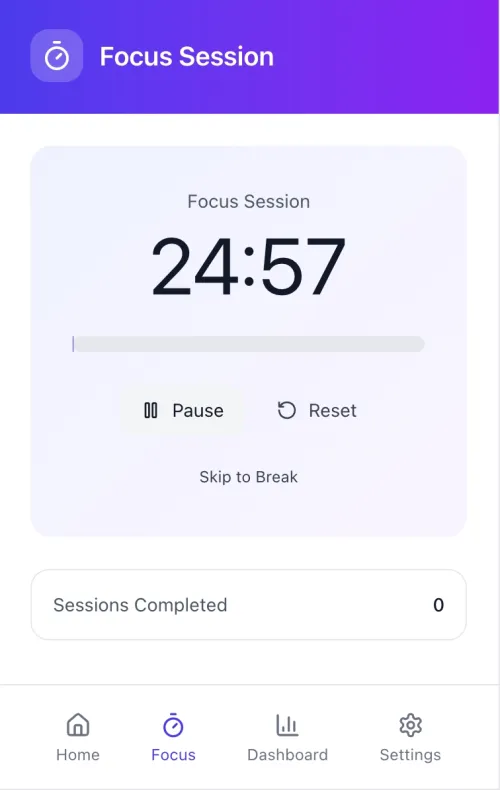
Set daily limits or start a Focus Session to protect time for studying, working, or deep focus.
Focus Session
25:00
Skip to Break
Read the Setup Guide for the full walkthrough with current screenshots.
Block distracting websites in supported desktop browsers.
Block or limit selected distracting apps on Android.
Set daily allowances for individual websites and apps.
Set an overall daily boundary for distracting app use.
Protect focused work and study time with configurable sessions.
Classify Android apps based on how you use them.
Review supported desktop and mobile activity in Mindova.
Get optional reminders when you need help returning to your task.
Reduce access to distracting websites during revision, online classes and independent study.
Protect focused work from video platforms, social feeds and news sites.
Use website blocking and timed Focus Sessions during writing, coding, research, design and other attention-heavy work.
Use Mindova as a temporary boundary around focus time, not as a promise to avoid the internet forever.
Learn how to add YouTube to Mindova and limit access during a Focus Session.
Follow the verified Mindova workflow for blocking TikTok’s website while studying or working.
See how Mindova blocks and limits distracting apps on Android, alongside websites on desktop.
Mindova blocks websites in supported desktop browsers and selected native apps on Android. The iPhone app is coming soon.
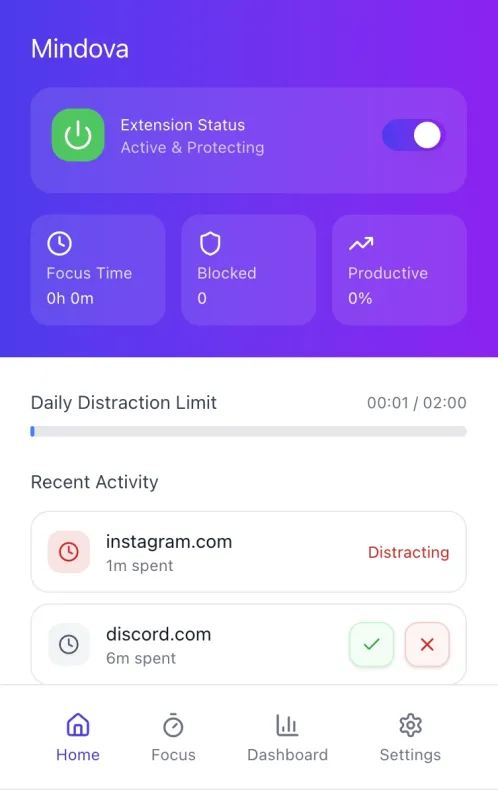
MINDOVA MOBILE
Mindova for Android is available on Google Play and runs on Mindova Pro. The iPhone app is on its way — join the waitlist for an early-bird offer.
Website and app blocking require permissions appropriate to each platform. Learn what Mindova accesses, how activity is processed or synced, and how you can manage or request deletion of your data.
Something not covered here? Contact the Mindova support team.
Mindova is a website blocker and focus extension for supported desktop Chromium browsers. It helps users block selected websites, set limits and protect focused work or study periods.
New users can try Mindova free for 7 days. Continued access after the trial requires a Monthly or Annual plan. No credit card is required to start the trial.
Mindova has been tested on Google Chrome, Microsoft Edge, Brave, Opera and Vivaldi and is installed through the Chrome Web Store.
Add a website to your personal block list and activate the rule. While blocking is active, Mindova keeps that website out of the way in your desktop browser. You can also set a daily time allowance for a single site.
A Mindova Focus Session lets you choose a focused period and use website blocking during the time you set aside for studying or work.
AI Nudges are optional contextual reminders that can encourage a return to the activity the user planned to be doing.
Mindova can block the web versions of supported social-media websites inside desktop browsers. It does not currently block native mobile applications.
Mindova for Android is available on Google Play with a Mindova Pro plan. The iPhone app is coming soon.
Mindova processes the browser information required to provide its features. The Privacy Policy explains its permissions, local processing, optional synchronisation and data-deletion process.
Contact the Mindova team through the support page with setup questions, product feedback or technical issues.
Block distracting websites and apps, set daily limits, and protect your next study, work, or focus session with Mindova.
7-day free trial • No credit card required to start • Paid plan required to continue

